← Semiconductors 101: a free course following the life of a chip
Semiconductors 101, unit 11
Lithography: printing the pattern
Lithography (litho) decides how fine a chip's patterns can be. It is one of the most precise steps, and the most advanced lithography machines are extremely expensive.
Goals
- Explain what photoresist, a photomask, exposure and development each do, using the analogy of printing a photo or using a stamp; tell positive from negative resist, and say why the litho area is lit yellow.
- Explain how a layer is aligned to the one below before exposure, how overlay is measured after printing, how the measured error is corrected on the next lot, and why a layer can still be redone before etch.
- Explain why shorter wavelengths of light can print finer patterns, how 193 nm light prints lines a few tens of nanometers wide, and why extreme ultraviolet (EUV) is so hard to do.

Step by step
- Under yellow lights, coat the wafer with photoresist, spin it even, then bake it briefly.
WhyResist changes where light hits it, like film; the yellow lamps filter out blue and shorter wavelengths.
If notUnder ordinary white lamps, the resist on wafers waiting for the next step would slowly get exposed and spoil.
- In the scanner, before exposing, find the alignment marks earlier layers left and work out how far the wafer is shifted and rotated.
WhyA wafer never sits in exactly the same spot, and earlier steps may have distorted it slightly; one point isn't enough.
If notExpose without aligning and this layer won't land on the one below: connections that should meet miss, and things that shouldn't touch do.
- Expose: shine light through the photomask onto the resist, one field at a time.
WhyResist changes only where light gets through; the mask is usually drawn four times larger and shrunk, so its errors shrink too.
If notOne dirty spot on the mask prints in the same place in every field, so many chips can fail together.
- Develop: bake again so the reaction finishes, then wash away the lit resist with developer (with negative resist, the unlit part).
WhyExposed and unexposed resist dissolve at different speeds, so after the rinse, what's left is the pattern; how far the reaction goes depends on the bake's temperature and time.
If notA hot plate cooler on one side leaves the lines wide on one side of the wafer and narrow on the other; a develop with the temperature or time slightly off leaves openings that don't clear.
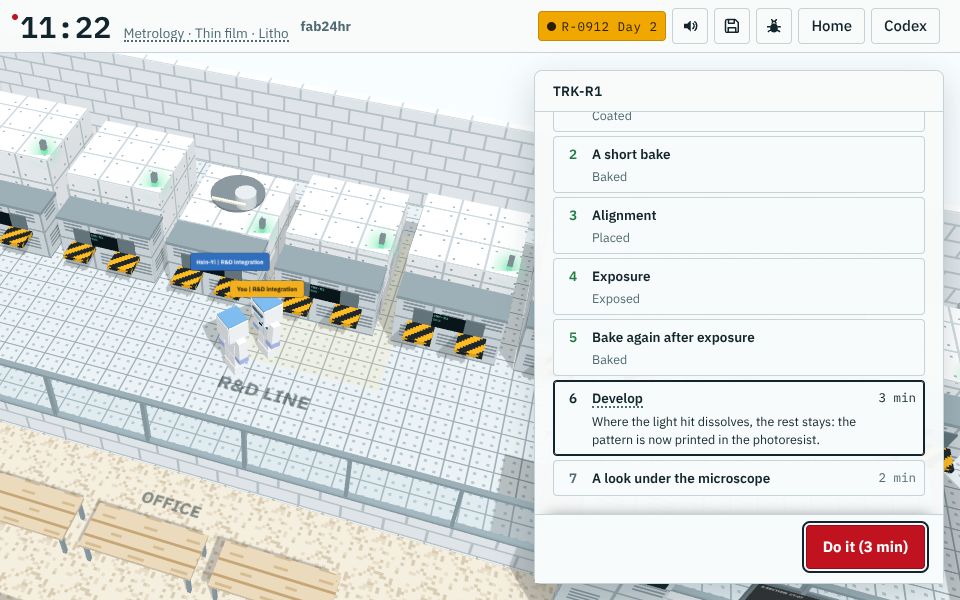
A screen from the game fab24hr; the tools, lot numbers and people are fictional. Play this part in the game → - Measure line width, defects and overlay: for example, a large box on the layer below, a small one on this layer, and how far the small one is off.
WhyThe allowed error is only a fraction of the finest line; the measured error goes back to the scanner, and the next lot is nudged the opposite way (a correction).
If notSkip it and the error goes into etch; on the same tool the error tends to repeat, so the next lot comes out off the same way.
- If it printed wrong, strip all the resist and coat, expose and develop again (rework).
WhyAfter developing, the pattern exists only in the resist, and the material underneath hasn't been touched.
If notOnce the wafer goes to etch, material cut away can't come back; rework itself costs an extra pass and hours of waiting.
- Hand the remaining resist, as a template, to etch or ion implant, then strip it.
WhyAreas under resist are protected, and only the openings get etched or implanted.
If notResist left behind travels to the next step as residue, and the next layer won't grow well or stick.
What you adjust, what can go wrong
- Wavelength (which light)
ChangesThe shorter the wavelength, the less light spreads through narrow gaps, and the finer the lines it can print.
If it is offToo long and fine lines blur together; stretching 193 nm means splitting a layer into two or three exposures, with more steps and more alignments.
- Focus (where the light comes to a point)
ChangesSets the height at which the pattern is sharpest; the steeper the light the lens takes in (the larger its numerical aperture), the shallower the range in focus.
If it is offWith the focus set off, or a surface too uneven or a wafer too bent, some places blur and the line width is off.
- Dose (how much light)
ChangesSets how much light each spot of the resist receives.
If it is offWith light whose photons each carry a lot of energy, such as EUV, the same dose means far fewer photons, so too little dose leaves the edges of fine lines ragged, and in bad cases lines break or merge; more light means a longer exposure per field and fewer wafers per hour.
- Overlay correction (scanner position, angle and scale)
ChangesUses the measured error (left-right and up-down, rotation, magnification) to nudge where, at what angle and at what scale each field of the next lot is printed, the opposite way; the amount is often worked out by a system automatically.
If it is offGet the correction wrong and overlay goes out of spec: caught before etch, the lot is reworked; etched anyway, wiring above misses the switches below and things that shouldn't touch do.
Key ideas
Why print it at all: like taking a photo
A phone chip holds more than ten billion switches, and its finest lines are thousands of times thinner than a hair. Nobody can draw that one line at a time: the whole pattern has to be made at once, and it has to come out identical on every wafer. Lithography, or litho (Taiwanese fabs call it "the yellow light"), uses light to print the circuit pattern a whole area at a time, like taking a photo: press the shutter and the whole scene lands on the film. Every layer of a chip has a different shape and its own photomask (the "negative" for the exposure), so a wafer comes back to litho dozens of times before it is finished. The printed pattern exists only in the photoresist, the light-sensitive film; next it usually goes to etch, which cuts away the uncovered material, and some layers go to ion implantation instead, where the resist keeps atoms out of the areas it covers.
Resist reacts to light: positive or negative, and why the lights are yellow
Photoresist is a film coated on the wafer that reacts to light: where light hits it, it changes, like the light-sensitive layer on photographic film. A photomask is a very flat plate of glass with a light-blocking film on it shaped like the circuit, so only the resist under the clear parts changes. The change can't be seen until a developer washes it out. With positive resist, the lit parts become easy to dissolve and wash away, so what is left matches the light-blocking parts of the mask; with negative resist it's the other way round, and the lit parts stay. The older negative resists were developed in organic solvents, and the resist that stayed soaked up solvent and swelled, so lines close together stuck to each other; positive resist is developed in a water-based alkaline solution and doesn't swell like that, which is why fine patterns mostly moved to positive resist, and negative resist is now also often used where the coat has to be very thick. Resist reacts to blue and ultraviolet light, which ordinary white lamps also contain, so wafers waiting for the next step would slowly get exposed by the room lights. The lamps in this area therefore filter out blue light and everything shorter, and what is left looks yellow.
Inside the tools: coat, align, expose, bake, develop
Coating, baking and developing usually happen in one coater/developer track, which is connected to the scanner, and wafers travel back and forth between the two on their own. A little resist goes onto the center of the wafer, the wafer spins fast to fling off the excess, leaving a layer about a micrometer thick or less, and a short bake drives out the solvent so the film settles. In the scanner, the tool first finds the alignment marks earlier layers left (usually in the narrow strips between chips), measures several of them, works out how far the whole wafer is shifted, how much it's rotated and whether it has grown a little, and then decides where to print each field. The first layer has nothing below it to line up with, so the wafer is just turned the right way using the small notch on its edge. The mask pattern is usually drawn four times larger than the real thing; lenses shrink it and print one small square at a time (an exposure field, roughly two to three centimeters on a side). Right after exposure the wafer goes back on a hot plate: in most deep-ultraviolet resists the light only makes a tiny amount of acid, and the reaction runs on during the bake, so how far it goes depends entirely on temperature and time, and one degree off on the hot plate can shift the line width by several nanometers. After that bake, the wafer is developed.
Shorter wavelength, finer lines, and harder to do
How fine it can print depends mainly on the wavelength of the light: light passing through a very narrow gap in the photomask spreads out a little, and the shorter the wavelength, the less it spreads and the sharper the line, just as a finer pen tip draws finer lines. So over the decades, exposure light has moved to shorter and shorter wavelengths; the deep ultraviolet common today is 193 nm. The most advanced, extreme ultraviolet (EUV), is only about 13.5 nm, but almost everything absorbs it: the light's whole path has to be a vacuum, glass lenses can't be used, so it takes mirrors made of dozens of thin layers, and the light itself comes from lasers hitting tens of thousands of tiny tin droplets every second.
How 193 nm prints lines a few tens of nanometers wide: water and several passes
Besides the wavelength, it matters how steep an angle of light the lens can take in (its numerical aperture): the steeper, the finer the lines, but the shallower the range that stays in focus. With air between the lens and the wafer, light at too steep an angle can't get out of the lens, so the numerical aperture is always below 1. Put a layer of ultrapure water there instead: light travels more slowly in water than in air, so the steep light that used to be reflected back passes into the water and reaches the wafer, taking the numerical aperture up to about 1.35. This is immersion lithography: in one exposure, 193 nm light prints densely packed lines around 40 nm wide. For anything finer, one layer is split into two or three passes, which is called multiple patterning: every other line goes to a second mask and the two masks are printed separately, or sparse lines are printed first and the film grown on both their sides becomes the new lines, so the spacing drops to a half, and another round takes it to a quarter. The price is more masks and more steps, and the alignment gets tighter. With EUV, some of those layers print in one go. With focus that shallow, once the surface has large height differences, the same pattern blurs in places and the line width is off, so when needed the surface is first polished flat with CMP (chemical mechanical polishing).
Measure overlay first: a mistake can be redone until etch
The wiring on one layer has to land exactly on the switches below it. How well this layer lines up with the one below is called overlay, and the allowed error is only a fraction of the finest line. So every lot is measured after develop for line width (how wide the lines came out), defects and overlay. Overlay is read from marks the photomask prints for that purpose, for example a large square on the layer below and a small square inside it on this one. A few wafers per lot and a few fields per wafer are measured with light: how far is the small square from the center, and which way? The errors fall into a few kinds, left-right and up-down, rotation, and magnification, and what is measured goes back to the scanner, which nudges the next lot the opposite way. That is a correction. If it is out of spec, the lot is put on hold; as long as it hasn't gone to etch, the resist can be stripped and the layer printed again. That is rework, and it costs an extra trip and hours of waiting; once etched, there is no way back, which is why this measurement matters so much.
Common misconceptions
- People sayThe litho area is lit yellow to protect the workers' eyes.
- In factNo. The yellow is for the photoresist: it reacts to blue and ultraviolet light, and yellow light doesn't expose it. A study found that people working in the yellow-lit area actually get tired eyes more easily, and under yellow light, reds, oranges and whites are often hard to tell apart.
- People sayNow that there is EUV, the older scanners are no longer needed.
- In factThey are still used. A chip has dozens of layers, and not every layer is that fine: only the finest layers use EUV, and the rest do fine with deep ultraviolet light.
Look: machines to take apart
 Coater/developer
 Scanner
Read
- What is photolithography? How do chip patterns get printed?
- What is photoresist? How are positive and negative resists different?
- What is overlay? Why does each layer of a chip have to line up with the one below?
- Why is the lithography area in a chip fab yellow?
Further
- How does 193 nm light print lines only tens of nanometers wide? Immersion lithography and multiple patterning
- What is extreme ultraviolet (EUV) light, and why is that machine so hard to build?
Play
Play a shift as a litho process engineer: printing circuit patterns onto wafers →
Think
- Before the next layer is printed, it has to be aligned to the one below; a tiny miss can ruin the whole wafer. What in your own life has to line up with the layer before it? What happens if it's off, and how would you check that it lines up?
- The most advanced lithography machines are extremely expensive. What might a machine that costly mean for the price of chips, and for who can afford to make the most advanced ones?
Teaching materials: slides
The key ideas, diagram, machines and questions of this unit as a slide deck, ready to project or to put into your own handouts.
Download slides (PPTX)345 KBDownload slides (PDF)427 KB
Free to use in class and for non-commercial teaching. Please credit fab24hr. Do not sell it or present it as your own work. Spot a mistake? Report it
Cite this article"Semiconductors 101, unit 11:Lithography: printing the pattern" fab24hr, updated . https://fab24hr.com/en/learn/lithography/