← Semiconductors 101: a free course following the life of a chip
Semiconductors 101, unit 20
When something goes wrong: from the alarm to "never again"
Even the most careful fab has problems. What makes the difference is whether, in those first minutes, things are done in the right order, and whether afterwards the holes that let the mistake through get closed.
Goals
- Give the order of what happens after a problem appears: stop it and contain it first, then confirm, draw the boundary, decide wafer by wafer what happens to them and look for the cause, and explain why it goes in that order and who usually decides.
- Explain why an OCAP (out-of-control action plan) is written in advance, and what happens when it doesn't cover the case.
- Explain how the 5 Whys follow a root cause down to a layer that can be changed, why a review looks for holes in the process rather than for who was careless, which kind of countermeasure is the most reliable, and why a case is closed only on evidence.
Step by step
- Watch for signals: a control chart crossing the limits or drifting to one side, an alert from FDC, a tool raising an alarm and stopping with its light on red.
WhyEach says "this is not normal anymore"; it is the first evidence that something has gone wrong.
If notMiss it and the tool keeps running, turning out bad lots one after another.
- Stop the tool and put the lots it ran in that period on hold, and only then check the number (for a gas leak, a chemical leak or a fire, people leave by the evacuation route first).
WhyThe number may be a mismeasurement, but if the tool keeps running while that is checked, it may ruin another lot.
If notEvery step a bad lot moves on is one more step to clean up.
- Do the stopping, holding and checking by the OCAP written in advance, line by line, and call the on-call engineer for anything it doesn't cover; preserve the scene before the repair starts, and a repaired tool also follows it and passes a qual run first.
WhyWhen trouble comes in the small hours, people are tired and anxious and memory is least reliable; the order on the sheet skips nothing. And a tool handed back after a repair only means it runs.
If notImprovising skips steps, and a different shift might take a different first step; put lots straight into a repaired tool and, if something in the repair isn't right, the first lot is hit all over again.
- Draw the boundary: counting from the last moment everything was known to be fine, every lot the same tool ran is in it, and all of them are held first.
WhyA tool with a problem rarely ruins just one wafer, and not every lot is measured, so lots made in that period may be affected too; draw the boundary first, then decide, and nothing slips through.
If notDecide only the lot in front of you and release it, and later it turns out other lots from the same period were hit too, by which time they have moved on to the next step.
- Decide wafer by wafer for everything inside the boundary (disposition): release, continue with a record attached, rework, or scrap.
WhyToo lenient and bad wafers are found much later; too strict and good ones are thrown away, and the later the step, the more a scrap costs. An OOS lot is reworked if it can be redone, but what etch removed or implant drove in can't be taken back; a lot released though it didn't follow the rules needs a signed deviation that QA checks.
If notLeave them undecided and the lots just sit while Q-time (the time limit before the next step) keeps counting down and the delivery date slips; let one person release a lot that didn't follow the rules and, if something goes wrong, no one can tell on what grounds it went.
- With the evidence kept from the scene, keep asking "why" (the 5 Whys) until you reach a process you can change; also ask "why wasn't it caught sooner".
WhyPeople always make mistakes; every layer of defense is like a slice of cheese with holes, and a mistake gets through only when the holes line up.
If notStop at the first cause you see, or blame only the last person who pressed the wrong button, and the hole stays where it is for the next one.
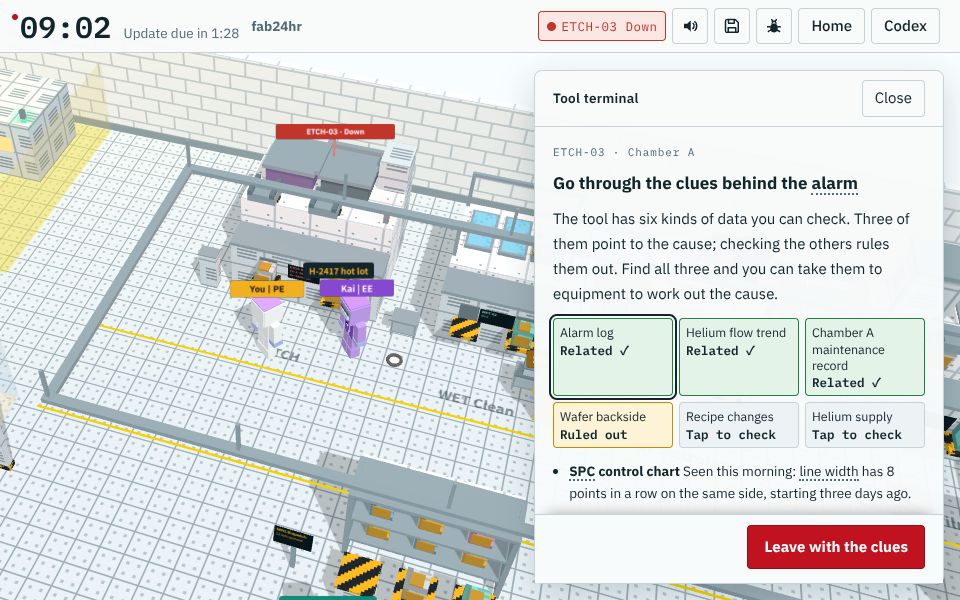
A screen from the game fab24hr; the tools, lot numbers and people are fictional. Play this part in the game → - Close the hole the root cause points to, then check tools of the same model and other products for the same hole (horizontal deployment); close the case only once it is shown to work.
WhyThe higher up, the more reliable: the system blocks it (mistake-proofing), then two people check, and only last reminders and training. "Done" isn't "working": it takes evidence, such as the numbers staying in their usual range for several weeks.
If notFix only this tool and a tool of the same model may have the same trouble a few months later; close the case without checking and the same thing comes back a while later.
Key ideas
Spotted it: stop it, contain it, then confirm
The signal can be points on a control chart crossing the limits or drifting to one side, an alert from FDC (the system watching a tool's sensors), the tool itself raising an alarm, its tower light turning red as it stops, or someone spotting a scratch on a wafer. The first thing to do then isn't finding the cause but stopping the damage: the tool stops and no more lots go in, and the lots it ran in that period are put on hold, kept where they are and not sent to the next step. The hold is put on in the MES (the system that tracks which step every lot is at), so the system won't dispatch the lot onward; what was seen and who owns the decision are written down too, or the next shift won't know why the lot can't move or whom to ask. Only then is the number checked: was it typed wrong, has the metrology tool drifted? The number may well be a mismeasurement, but if the tool keeps running while that is checked, it may ruin another lot. Anything that can hurt people, such as a gas leak, a chemical leak or a fire, is the exception: people leave by the evacuation route first, and lots and tools come after.
Follow the OCAP written in advance; don't improvise at night
An OCAP is an out-of-control action plan written in advance: what to stop, which lots to hold, what to check, whom to tell, often with the most likely or easiest-to-check causes first. It is written ahead because problems don't pick their time: at three in the morning a tool lights red, the people on the floor are tense, the engineer just woken up isn't fully awake, and tired, anxious people can't count on memory. Going down the sheet line by line skips nothing, the people on the line don't have to wait for an engineer's call at every step, and whichever shift meets the problem takes the same first step. What it doesn't cover means a call to the on-call engineer, and afterwards the case is added to the OCAP. A repaired tool follows it too: Equipment handing the tool back only means it runs, so a few test wafers go through a qual run first, and only when the results are in spec and Process has checked them is the tool released for lots.
Draw the boundary first, then decide wafer by wafer
Holding the lot in front of you isn't enough: counting from the last moment everything was known to be fine, lots the same tool ran in the same time window may be affected too, since a tool with a problem rarely ruins just one wafer. So the boundary is drawn first and everything inside it held, and only then is each wafer decided from the records and measurements, which is called disposition; wafers in the same lot can go different ways, a few scrapped, a few reworked, the rest carrying on. An OOC lot may still be within spec and can be released or kept on hold for more checks; an OOS lot is reworked if it can be redone; what etch removed or implant drove in can't be taken back, so the impact is assessed first: wafers still usable continue with a record attached, some are measured again before a decision, and only those that can't be used are scrapped. As for who decides, a common split is: the process engineer for that step works out where the problem is, process integration goes through each wafer's history and decides what happens to it, and QA checks that the action is on record. Releasing a lot that didn't follow the rules but is judged still usable needs a deviation saying what was different, why it can still be used and who signed, and in some cases the customer has to agree too.
Look for holes, not people: dig down to what can be changed, and close only once it works
A root cause means not stopping at the first cause you see, but asking down to the layer where "once this is fixed, the same thing won't happen again", with evidence for every answer. A common tool is asking "why" five times (the 5 Whys): when an etch tool keeps shedding particles, for example, the last answer may be that the form for changing a recipe has no box for "does the maintenance schedule need recalculating?"; you are at the bottom only when you hit a process you can change. The evidence comes from the scene, so it is preserved the moment something happens, with tool logs left as they are; also ask "why wasn't it caught sooner". When the damage is inside a chip, failure analysis provides the evidence: power it up and look from the outside to narrow it down to one spot, and only then cut that spot open, because once it is cut there is no going back. People always make mistakes, and stopping at "carelessness" leaves only "be more careful next time" as the fix. The higher up a countermeasure sits, the more reliable it is: the system blocks it (mistake-proofing), then two people check, and only last come reminders and training; then tools of the same model and other products are checked for the same hole (horizontal deployment). "Done" and "working" are two different things: the case is closed only on evidence, such as the numbers staying in their usual range for several weeks, and the whole thing is often written up as an 8D report.
Common misconceptions
- People sayThe number might be a mismeasurement, so there's time to confirm before stopping the tool.
- In factConfirming takes time, and if the tool keeps running meanwhile it may ruin another lot. That is why an OCAP goes stop, contain, then confirm: before you know why something went wrong, stop the damage; the cause can wait a moment.
- People sayWhen something goes wrong, find who pressed the wrong button, ask them to be more careful, and that's the end of it.
- In factHowever careful people are, they make mistakes. Writing the cause down as "carelessness" or "didn't follow procedure" is too easy and often misleading, because it never finds what really needs changing, and the hole stays where it was. A good review asks where the process makes mistakes easy, and in the moment itself, what matters most is getting the facts out clearly, not finding someone to blame.
Read
- What does OCAP mean in a chip fab?
- What is a lot hold, and who decides whether to release, rework or scrap?
- What is root cause analysis, and how do 8D and the 5 Whys work?
Further
- What is failure analysis (FA), and how do engineers find out why a chip failed?
- What does MO mean in a chip fab?
Play
Think
- At three in the morning a tool lights red, a lot is waiting, the engineer is asleep, and the person next to you says one reset usually does it. What does calling per the OCAP cost, and what does trying it first cost?
- Think of a small mistake you keep making, such as leaving home without your keys. If you don't blame your own carelessness but look for "what makes this easy to forget", how would you change things so it can't happen or can't be forgotten?
Teaching materials: slides
The key ideas, diagram, machines and questions of this unit as a slide deck, ready to project or to put into your own handouts.
Download slides (PPTX)60 KBDownload slides (PDF)92 KB
Free to use in class and for non-commercial teaching. Please credit fab24hr. Do not sell it or present it as your own work. Spot a mistake? Report it
Cite this article"Semiconductors 101, unit 20:When something goes wrong: from the alarm to "never again"" fab24hr, updated . https://fab24hr.com/en/learn/troubleshooting/